
Function
A well structure function block that can be use many time
ex:
print()print() is a function that can print data to the console.
The reason using function:
- Reduce repeated code
- Higher effeciency for development
Syntax
Define function
def function_name(params):
    task
return valueparamsis optional to define, if no parameters required to pass then leave it as()function_namecan't be keywords- either it return value or run the task
without returning any data, exprint()at the last line
Using function
function_name(params)Type of Arguments / Parameters
def func(params):
    ...

func(args)- Parameters (params) is the
placeholderfor the function - Arguments (args) is where you
pass the valueto the function.
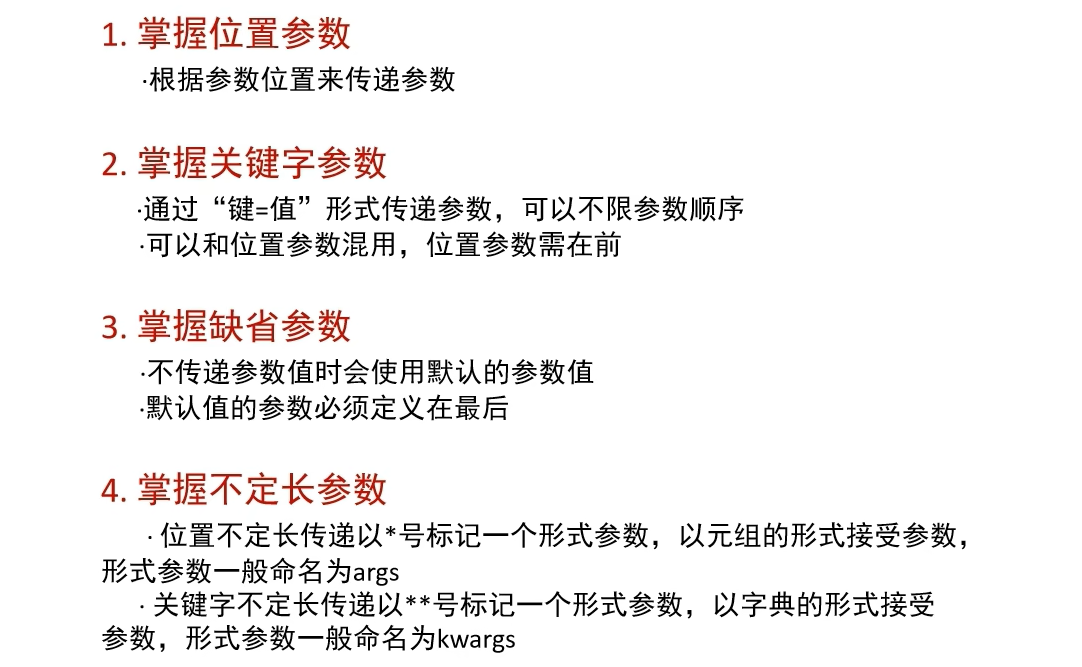
1. Positional Arguments 位置参数
These are the standard type. The value assigned to them depends on the order (Position) in which you provide the arguments.
type-of-params.py
# Positional Arguments
def user_info(name, age, gender):
    return name, age, gender

name, age, gender = user_info("John", 12, "Male")
# The args is assigned follow exactly
# where the params placed in function

print(f"{name} is a {gender}, now he is {age} year old")
Output:
John is a Male, now he is 12 year old2. Keyword Arguments 关键字参数
- It's done by using
args_name = value, when calling the function. - It
can mixed with positional arguments, butpositional argumentsmust place at exact positionsame as the parameters of the function - If all of the arguments is define by keyword arguments, then the arrangement are not restricted.
# Keyword Arguments
# using same user_info function
name2, age2, gender2 = user_info(age=12, name="Ben", gender="Male")
# The way of define args with keyword, the arrangements are not restricted
print(f"{name2} is a {gender2}, now he is {age2} year old")

# Mixed with positional args,
name3, age3, gender3 = user_info("Jean", gender="Girl", age=17)
print(f"{name3} is a {gender3}, now he is {age3} year old")
Output:
Ben is a Male, now he is 12 year old
Jean is a Girl, now he is 17 year old
3. Variable Length Arguments 不定长参数
- Variable length arguments also known as interchangeable arguments.
- Which is use when we cannot determine how many parameters is required.
- It have 2 types, which is
Positional Arguments (*args)andKeyword Arguments (**kwargs) - By using variable length arguments, we can pass the arguments as many as we need.
1. VLA - Positional Arguments (*args)
*argsis with the data type oftuple.
# *args
def get_args(*args):
    print(args)
    print(type(args))

get_args(1)
get_args(12, 12, 34, 56)
get_args(True, "Jia", 3.142)
Output:
(1,)
<class 'tuple'>
(12, 12, 34, 56)
<class 'tuple'>
(True, 'Jia', 3.142)
<class 'tuple'>
2. VLA - Keyword Arguments (**kwargs)
**kwargsis with the data type ofdict.
# **kwargs
def get_kwargs(**kwargs):
    print(kwargs)
    print(type(kwargs))

get_kwargs(name="Dalton")
get_kwargs(name="Daniel", addr = "UK")
Output:
{'name': 'Dalton'}
<class 'dict'>
{'name': 'Daniel', 'addr': 'UK'}
<class 'dict'>
4. Missing Parameters 缺省参数 (Default Parameters)
- Missing Parameters also known as default parameters, which is
assigned a default value to the parameters. - If the arguments of fucntion is
not define, it willapply the default parameters. - If the arguments is
definedthendefault paramaters will be replaced.
# Default Params
def print_user_info(name, age, gender = "Boy"):
    print(f"{name} is a {gender}, now he / she is {age} year old")

print_user_info("Willy", 12)
print_user_info("Jenny", 23, "Girl")
Output:
Willy is a Boy, now he / she is 12 year old
Jenny is a Girl, now he / she is 23 year old
5. Function as a parameters
- Function can also be a parameters/arguments for another function.
## Function as a params

def addition_operation(compute):
    results = compute(1, 2)
    print(type(compute))
    print(results)


def compute(x, y):
    return x + y

addition_operation(compute)
Output:
<class 'function'>
3
Usage
Define and using function
Ex: len() is a built-in function by python to get number of words, now we replicate it and named it with, length_of_word().
user-def-function.py
# get the length of str using built in len() and user define function

text = str("Hello")

print(len(text)) # python built-in function

def length_of_word(text: str):

    length = 0

    for i in text:
        length += 1

    return length

print(length_of_word(text))
Results:
5
5
Ex: with multiple parameters.
user-def-function-2.py
def add(x, y):
    return x + y

def add_(x, y):
    result = x + y
    print(result)

add_(1, 2)
print(add(1, 2))
INFO
- The parameters should follow the position accordingly.
- All parameters are required
Difference between add_() and add():
add()has return value, so it required to write asprint(add())or using avariable nameto store / get the results, withoutprint()function is used will causes nothing can be seen.add_()will directly execute the print function to render the value to the console- Since
add_()will not have returning value, so it's data type will be< class 'NoneType' >, returnNone
Extra
None, <class 'NoneType'> can be use for the variable name that dont not have value at the time.
Results:
3
3
Returning None Type manually
Actually we can return None manually in some scenario.
function-return-none.py
import random

status_code = random.randint(0, 1)

def is_buy_success(status_code: int = 0):
    if status_code == 1:
        return "SUCCESS"
    else:
        return None

results = is_buy_success(status_code=status_code)

print(f"Status code: {status_code}")

if results is None:
    print("FAILED !")
else:
    print(results)

# or

if not results:
    print("FAILED !")
else:
    print(results)
Results:
Status code: 0
FAILED !
FAILED !
Multiple return value
If a function that required to return multiple value, we still using keywords of return to return the value, but across multiple of the value using , to seperate it.
By using same method of , to seperate the variable name to receive the return value from the function.
Info
- Since it return multiple value, so the function actually returning type of tuple.
- The position of variable name to receive the return value of fucntion must same as the position of returning data.
multiple-return-value.py
def math_calc(x, y):
    plus = x + y
    minus = x - y
    multiply = x * y
    division = x / y

    return plus, minus, multiply, division

p, minus, multiply, d = math_calc(1, 2)
print(f"Plus result: ", p)
print(f"Minus result: ", minus)
print(f"Multiply result: ", multiply)
print(f"Divide result: ", d)

# Type of multiple return value fucntion
print(type(math_calc(1, 3)))
Output:
Plus result:  3
Minus result:  -1
Multiply result:  2
Divide result:  0.5
<class 'tuple'>
Scope for the variable in a function
A variable is only available from inside the region it is created. This is called scope.
Normally, we call a variable name inside of a function as local variable. And it's not able to access outside of it.
In order to access the variable name function, we have to add global variable_name to define it as a global variable, then we can define a value for it.
Local variable
def add(x, y):
    num = x + y # Local variable = not able to access it outside
    print(num)

add(2, 3)

print(num) # Get error: "num" is not defined.
Output: (error)
print(num)
      ^^^
NameError: name 'num' is not defined. Did you mean: 'sum'?
Global variable
def add(x, y):
    global num
    num = x + y
    print(num)

add(2, 3)

print(num)
Output:
5
5
Documentation for function
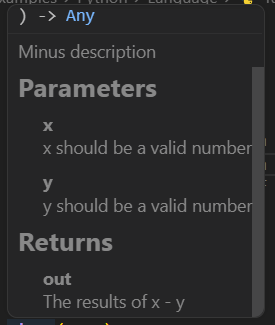
By using multiple line comment to describe the usage of the function block.
Example: function-documentation.py
def minus(x, y):

    """
    Minus description

    :param x: x should be a valid number
    :param y: y should be a valid number
    :return: The results of x - y

    """

    return x - y

minus(5, 3)- By hovering the
minus(5, 3)function will able tosee the descriptionlike:
Conclusion
- For anonymous function: Click here