
DDL - Data Types in MySQL
Data types in MySQL can be catogorised in 3 main category:
- Numeric
- String
- Date and Time
Numeric
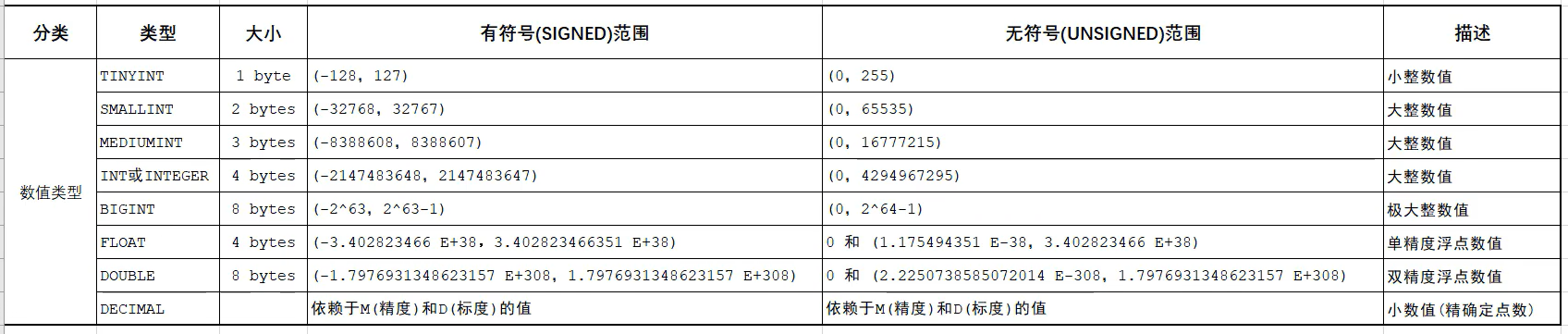
- For
DECIMAL,
123.45Mmeans it has 5 digit.Dmeans it has 2 decimal places.
Usage with select correct data types
1. Age
For example age we can use INT as our data type. However there is another better option of data types.
-> TINYINT with UNSIGNED can be the best choice.
Because,
- Age only exist in positive value only
- The maximum value of UNSIGNED TINYINT is 255, which is already enough if storing age data.
sql
age TINYINT UNSIGNED2. Marks
- The marks usually written in
dd.d% - So it only required 1 decimal places.
sql
marks DOUBLE(4, 1)String
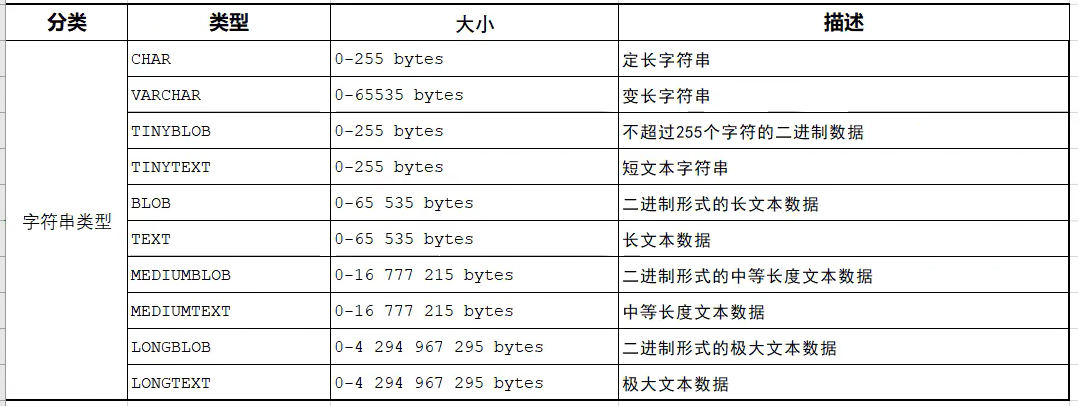
Usage
CHAR()
sql
name CHAR(10);- It means that it only can store maximum
10 letter. - If we
only store 1 text, it also use up thespaceof10 text. - If the number of text is less then the maximum value, it will fill up with
space. - It gives the
best performance.
VARCHAR()
sql
name VARCHAR(10);- For
VARCHAR(10), when weonly store 1 text, it only use 1 space only. - It use the space
based on the number of letter. - It has
lower performancethanCHAR(), as it required tocalculate the space neededbased on thenumber of letter.
Choice of VARCHAR() and CHAR() based on the condition
1. Username
- It's better to use
VARCHAR(). - Because the username has
no fixed length.
2. Gender
- It's better to use
CHAR(). - It
onlyhave2 options. - Can use combination of
F / MorB / Gto represents.
Date and Time

- We usually use
DATE,TIMEandDATETIMEmost of the cases.
Usage
Birthday
- For birthday we usually use
DATEas a data type. - Because we
don't need the precise timefor a birthday.
Comprehensive Instance
Design a worker database table.
- It has Number of record (Only number)
- Worker ID (Combination of text and number, Max: 10)
- Name (Max: 50)
- Gender (Max: 1, Use G / B to represents)
- Age (Cannot be negative value)
- Join Date (Date only)
Example
sql
mysql> CREATE TABLE IF NOT EXISTS worker (
    -> ID INT,
    -> WORKER_ID VARCHAR(10),
    -> WORKER_NAME VARCHAR(50),
    -> GENDER CHAR(1),
    -> AGE TINYINT UNSIGNED,
    -> JOIN_DATE DATE
    -> );
Output and validate
Output:
Query OK, 0 rows affected (0.04 sec)Validation:
mysql> show tables;
+----------------+
| Tables_in_test |
+----------------+
| student        |
| worker         |
+----------------+
2 rows in set (0.00 sec)
mysql> desc worker;
+-------------+------------------+------+-----+---------+-------+
| Field | Type | Null | Key | Default | Extra |
+-------------+------------------+------+-----+---------+-------+
| ID | int | YES | | NULL | |
| WORKER_ID | varchar(10) | YES | | NULL | |
| WORKER_NAME | varchar(50) | YES | | NULL | |
| GENDER | char(1) | YES | | NULL | |
| AGE | tinyint unsigned | YES | | NULL | |
| JOIN_DATE | date | YES | | NULL | |
+-------------+------------------+------+-----+---------+-------+
6 rows in set (0.00 sec)