
Document Operation in Python (Read)
In daily life the common operation to the documents will be:
- Open
- Close
- Read
- Write
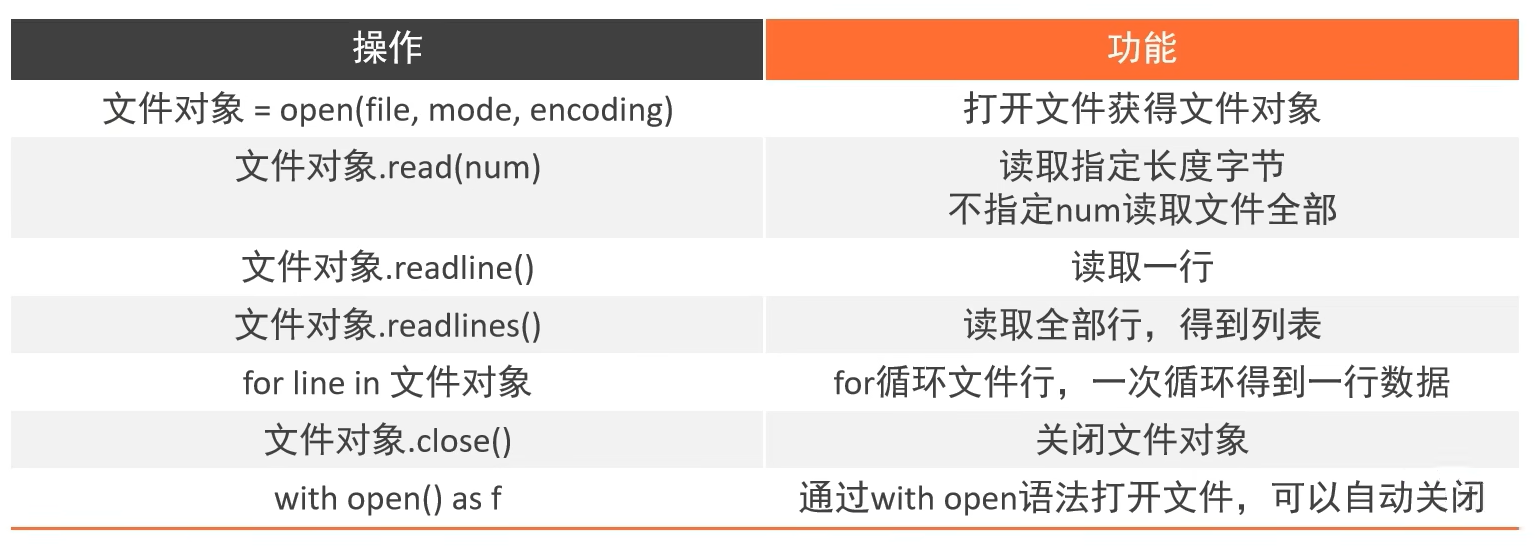
open()
Usage
py
open(name, mode, encoding)- Name: file path (with directory)
- Mode: Write, Read, ...
- Encoding: Normally document will encode with UTF-8
Info
- Position of encoding is not on 3, so can't use positional arguments, must using keywords arguments to define

'r'	open for reading (default)
'w'	open for writing, truncating the file first
'x'	create a new file and open it for writing
'a'	open for writing, appending to the end of the file if it exists
'b'	binary mode
't'	text mode (default)
'+'	open a disk file for updating (reading and writing)
Example
Step:
Create a file name "test.txt" at the root of the project that same with the python file
Define a variable name and open the test file, with the mode = read, and encoding of UTF-8
file-operation.py
py
file = open("./test.txt", "r", encoding="UTF-8")
print(type(file))
Output:
<class '_io.TextIOWrapper'>read()
Step 3: Open test.txt file and write the data below:
test.txt
text
Hello
Hi
Hola
Ni Hao
Syntax
py
f.read(num)- If num is not define, by
default it will read entire file nummeansthe length of the data readfrom a document (unit:byte)
Usage
py
print(file.read())Output:
Hello
Hi
Hola
Ni Hao
Usage - with size
py
# If use directly will EOF (end of file), must comment file.read() first
print(file.read(5))
Output:
Helloreadlines()
readlines()will read entire file and return alist, each line of data will be each element of the list.
Syntax
py
f.readlines()Usage
py
# readlines
lines = file.readlines()

print(type(lines))
print(lines)
Output:
<class 'list'>
['Hello\n', 'Hi\n', 'Hola\n', 'Ni Hao']
readline()
- It only read 1 line at once (one call).
Syntax
py
f.readline() # Read 1st line
f.readline() # Read 2nd line
Usage
Print directly
py
# readline
print(file.readline()) # 1st line
print(file.readline()) # 2nd line
Output:
Hello

Hi
Using for to print all lines
py
# using for with readline
for line in file:
    print(line)
Output:
Hello

Hi

Hola

Ni Hao
close()
- Use to close the document.
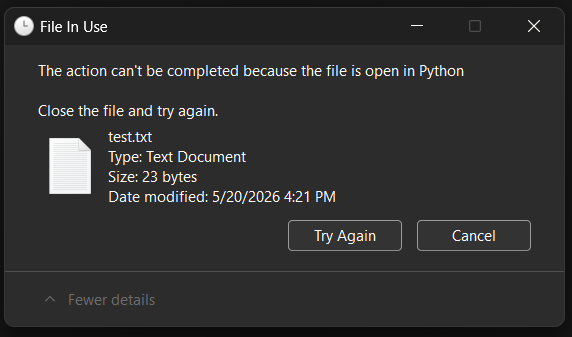
- If the document is not close even the programme not using will cause the waste of resources.
- For most of the problem will be faced is the file cannot be deleted while the file is in use.
Example
py
import time

time.sleep(111111111) # Programme stop here until timer is gone
file.close()
with open() as f
- By using
with open()canprevent us from forgotting put file.close(). - As after completed the file operation
python will automatically close it.
Usage
py
with open("./test.txt") as f:
    line = f.readlines()
    print(line)
Output:
['Hello\n', 'Hi\n', 'Hola\n', 'Ni Hao']Conclusion
Extra: Find the number of same element in a file
text2.txt
text
python js java
python python java
js c++ c
ruby react python- Find number of times that
pythonappeared.
file-operation-2.py
py
with open("./text2.txt", mode="r", encoding="UTF-8") as f:
    lines = f.readlines()
    number_of_python_appeared = int(0)

    for line in lines:
        number_of_python_appeared += line.count("python")

    print(f"Python appeared {number_of_python_appeared} times")

# or

with open("./text2.txt", mode="r", encoding="UTF-8") as f:

    number_of_python_appeared = int(0)

    for line in f:
        number_of_python_appeared += line.count("python")

    print(f"Python appeared {number_of_python_appeared} times")
Output:
Python appeared 4 times
Python appeared 4 times