
Data Collction - List 列表 (list) []
- We will using data collection method to store all the data in that specific category.
Properties of list:
list allow repeat data
Syntax
Define list
py
# Literal
["John", "Ben"]

# With variable name
student_list = ["John", "Ben"]
Define Empty list
py
empty_list_1 = []
empty_list_2 = list()
Get item in a list
py
student_list = ["John", "Ben"]

print(student_list[0]) # John

# Index of list start at 0
INFO
- If the index of the list is from
left to right,it followpositive intindex,0, 1, 2, ... - If its from
right to leftit become-1, -2, -3, ....(negative int) - 0=+ 0
Method of list
Basic Introduction of method
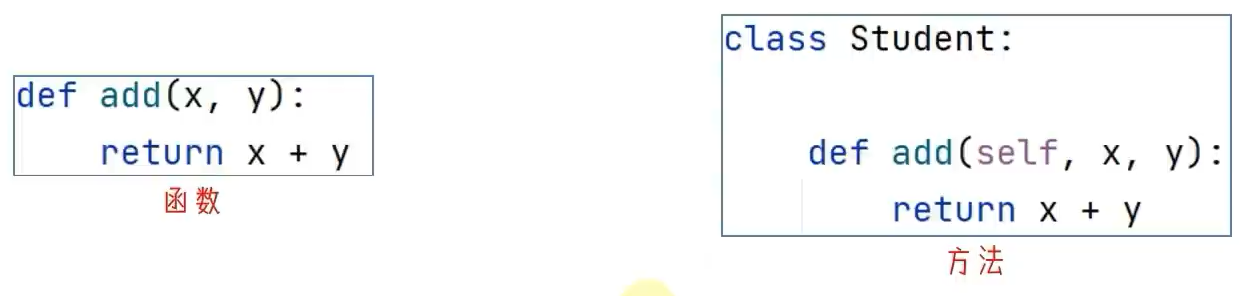
methodin python means a function define in a class.- Different of usage between class and function:
Way of define
py
# Function
def add(x, y):
    return x + y

# Method
class Maths:

    def add(x, y):
        return x + y
Way of usage:
py
# Function
print(add(1, 2))

# Method
maths = Maths()
print(maths.add(1, 2))
1. Find index of an item in list (list.index(value))
list-method.py
py
name_list = ["Ben", "John", "Kai", "Alpha", "Elen"]
#             0,      1,      2,      3,       4

# 1. Find index of an item in a list
print(f"Index of 'John' in list is at {name_list.index("John")} ") # 1
Results:
Index of 'John' in list is at 12. Update of an element in list (list_name[index] = new_value)
list-method.py
py
# 2. Update of an element in list
# Update Elen -> Alen
name_list[4] = "Alen"
print(name_list)
Results:
['Ben', 'John', 'Kai', 'Alpha', 'Alen']3. Insert an new item to the list at specific position (list.insert(position_index, object))
- insert index number will be a
index number of old list, if the item is already exist.
list-method.py
py
# 3. Add an new element to specific position
# ['Ben', 'John', 'Kai', 'Alpha', 'Alen']
name_list.insert(2, "Lame")
print(name_list)
Results:
['Ben', 'John', 'Lame', 'Kai', 'Alpha', 'Alen']4. Insert an item at the end of the list (list.append())
list-method.py
py
# ['Ben', 'John', 'Lame', 'Kai', 'Alpha', 'Alen']

# 4. add new item at the end of the list.
name_list.append("Julie")
print(name_list)
Results:
['Ben', 'John', 'Lame', 'Kai', 'Alpha', 'Alen', 'Julie']5. Extend a new List of item to a list (list.extend())
list-method.py
py
# ['Ben', 'John', 'Lame', 'Kai', 'Alpha', 'Alen', 'Julie']
# 5. add a list of item to a list
new_student_list = ["Ali", "bob"]
name_list.extend(new_student_list)
print(name_list)
Results:
['Ben', 'John', 'Lame', 'Kai', 'Alpha', 'Alen', 'Julie', 'Ali', 'bob']6. Remove item in a list (del list[index] / list.pop(index))
list.pop()by default willremove last item in a listifno index is mentioned.
list-method.py
py
# 6. Delete item in a list

# ['Ben', 'John', 'Lame', 'Kai', 'Alpha', 'Alen', 'Julie', 'Ali', 'bob']
# Remove item at the last
name_list.pop()
print(name_list)

# ['Ben', 'John', 'Lame', 'Kai', 'Alpha', 'Alen', 'Julie', 'Ali']
name_list.pop(0) # Remove Ben
print(name_list)

# ['John', 'Lame', 'Kai', 'Alpha', 'Alen', 'Julie', 'Ali']
# another method of delete item in a list
del name_list[3] # Remove Alpha
print(name_list)
# ['John', 'Lame', 'Kai', 'Alen', 'Julie', 'Ali']
Results:
['Ben', 'John', 'Lame', 'Kai', 'Alpha', 'Alen', 'Julie', 'Ali']
['John', 'Lame', 'Kai', 'Alpha', 'Alen', 'Julie', 'Ali']
['John', 'Lame', 'Kai', 'Alen', 'Julie', 'Ali']
7. Remove based on the value in a list (list.remove(match_value))
list-method.py
py
# 7. remove an item based on the match value
# ['John', 'Lame', 'Kai', 'Alen', 'Julie', 'Ali']
name_list.remove("Lame") # remove Lame
print(name_list)
Results:
['John', 'Kai', 'Alen', 'Julie', 'Ali']8. Clear all item in a list (list.clear())
list-method.py
py
# 8. clear entire list
# ['John', 'Kai', 'Alen', 'Julie', 'Ali']
name_list.clear()
print(name_list)
Results:
[]9. Find a count of an item in a list (list.count(match_value))
list-method.py
py
################################
# Create a new list with the random number from a dice
################################

dice_num_gets = [1, 6, 3, 1, 1, 2, 5, 4, 6, 6, 3, 2]

# 9. Get a items count
# num of getting 1 in a from a dice roll gets
print(dice_num_gets.count(1)) # 3 (3 "1" in a list)
Results:
3Conclusion and overall code
| Methods | Description |
|---|---|
| list.index() | Get the index number of an item in a list based on the item. |
| list.insert() | Add an new item into a list. |
| list.append() | Add an new item at the end of a list. |
| list.extends([]) | Add an list [] of item at the end of a list. |
| list.[index] = value | Update an item in a list. |
| list.pop() | Delete an new item into a list. Default: last item |
| del list_name[index] | Delete an item into a list, it follow the index number |
| list.remove() | Delete an item into a list, it follow the index number based on the item |
| list.clear() | Clear entire list |
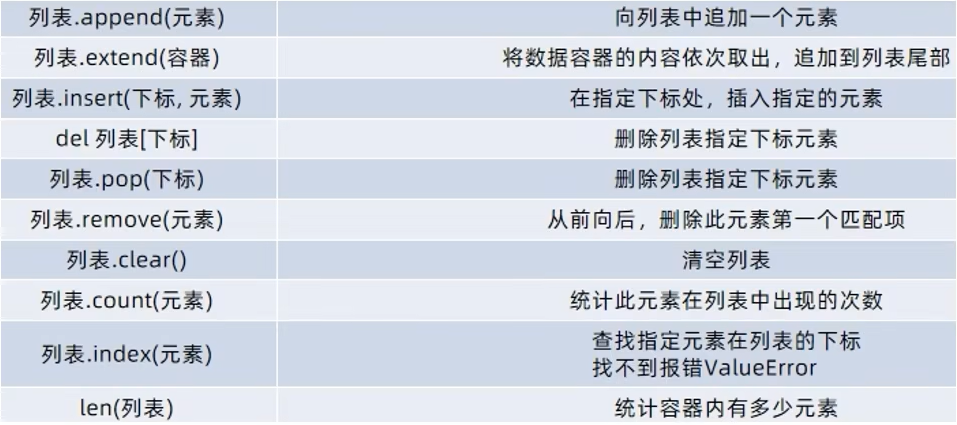
Overall code: list-method.py
Click to expand
py
name_list = ["Ben", "John", "Kai", "Alpha", "Elen"]
#             0,      1,      2,      3,       4

# 1. Find index of an item in a list
print(f"Index of 'John' in list is at {name_list.index("John")} ") # 1

# 2. Update of an element in list
# Update Elen -> Alen

name_list[4] = "Alen"
print(name_list)

# 3. Add an new element to specific position
# Note that current name_list =
# ['Ben', 'John', 'Kai', 'Alpha', 'Alen']

name_list.insert(2, "Lame")
print(name_list)

# ['Ben', 'John', 'Lame', 'Kai', 'Alpha', 'Alen']
# 4. add new item at the end of the list.
name_list.append("Julie")
print(name_list)

# ['Ben', 'John', 'Lame', 'Kai', 'Alpha', 'Alen', 'Julie']
# 5. add a list of item to a list
new_student_list = ["Ali", "bob"]
name_list.extend(new_student_list)
print(name_list)

# 6. Delete item in a list

# ['Ben', 'John', 'Lame', 'Kai', 'Alpha', 'Alen', 'Julie', 'Ali', 'bob']
# Remove item at the last
name_list.pop()
print(name_list)

# ['Ben', 'John', 'Lame', 'Kai', 'Alpha', 'Alen', 'Julie', 'Ali']
name_list.pop(0) # Remove Ben
print(name_list)

# ['John', 'Lame', 'Kai', 'Alpha', 'Alen', 'Julie', 'Ali']
# another method of delete item in a list
del name_list[3] # Remove Alpha
print(name_list)
# ['John', 'Lame', 'Kai', 'Alen', 'Julie', 'Ali']
Useful Built-in Functions for Lists
| Function | Description |
|---|---|
len(list) | Get number of items |
max(list) | Largest value |
min(list) | Smallest value |
sum(list) | Sum of numbers |
sorted(list) | Return sorted copy |
list() | Convert iterable to list |
Scenario based usage
Checking if Item Exists
- use
match_value in list_nameto get a Boolean value.
py
numbers = [1, 2, 3]

print(2 in numbers)
# True
Slicing
py
numbers = [1, 2, 3, 4, 5]

print(numbers[1:4])
# 1 -> 4 (3 items) from index 1 start
# [2, 3, 4]
A short way to create lists.
py
squares = [x * x for x in range(5)]

print(squares)
# [0, 1, 4, 9, 16]
Usage
- Partialy usage only...
list.py
py
student_list = ["Ben", "John", "Kai", "Alpha", "Elen"]

# Print entire list
print(student_list)
# Type of list
print(type(student_list))

# print follow the index of the list
# First Items
print(f"The first student = {student_list[0]}")
# Last items
print(f"The last student = {student_list[-1]}")
# or
print(f"The last student = {student_list[4]}")

# Total items in the list
print(f"Length of the list = {len(student_list)}")

# Index of Ben
print(student_list.index("Ben")) # 0 (first item)

# Add an new name at the end
student_list.append("Bob")
print(student_list)

# Add a name in front of Bob (index of bob: 5)
# Note bob position at 5 in new item added then bob will be at 6, 5 will be kay
student_list.insert(5, "Kay")
print(student_list)

new_comers = ["Ola", "Lynn"]
student_list.extend(new_comers)
print(student_list)

# Ben and John withdraw
# index of, ben = 0, john = 1
del student_list[0]
student_list.pop(1)
print(student_list)

# Ola replaced by another students - Lu
# Ola index number = 5
student_list[5] = "Lu"
print(student_list)
Results:
['Ben', 'John', 'Kai', 'Alpha', 'Elen']
<class 'list'>
The first student = Ben
The last student = Elen
The last student = Elen
Length of the list = 5
0
['Ben', 'John', 'Kai', 'Alpha', 'Elen', 'Bob']
['Ben', 'John', 'Kai', 'Alpha', 'Elen', 'Kay', 'Bob']
['Ben', 'John', 'Kai', 'Alpha', 'Elen', 'Kay', 'Bob', 'Ola', 'Lynn']
['John', 'Alpha', 'Elen', 'Kay', 'Bob', 'Ola', 'Lynn']
['John', 'Alpha', 'Elen', 'Kay', 'Bob', 'Lu', 'Lynn']